All names, addresses, telephone numbers and technical values are fictional illustrations matching the six-page residential demo PDF. Start with Part 3, then review Parts 1 and 2. Customer details can carry into the tool; responsible personnel must verify registration and technical entries. No actual inspection or testing took place, so both inspection declarations remain unticked and all signatures and dates remain blank.
Fictional Kowloon home · One board · Four outgoing circuits
Fictional details · No inspection performed · Not an issued certificate
Owner: DEMO CHAN (fictional)
Installation: Flat A, 8/F, Example Building, 1 Example Road, Kowloon (fictional)
Illustrative supply: single phase, 220 V · largest switching device: 63 A
63 A, 220 V and the circuit and device values identify this sample PDF only. They are not design or equipment-selection recommendations for your home.
01
Responsible person · Customer supplies details; the worker verifies the installation and owner particulars.
Part 3, item (5): customer and installation details
This example covers one residential flat. The enquiry contact may differ from the installation owner; do not substitute one for the other without checking.
Page 2 · Find it on the form
The image is a fictional unsigned draft. Read the larger field cards for each entry.
O1
Address of the Fixed Electrical Installation
Entry in this example
九龍示範道1號示範大廈8樓A室(虛構)
What to check:The Chinese text matches the demo PDF: fictional Flat A, 8/F, Example Building, 1 Example Road, Kowloon. Actual entries must identify the building, floor and flat consistently across drawings and records.
O2
Name or Organisation of the Owner
Entry in this example
陳示範(虛構)
What to check:The fictional Chinese name is retained from the PDF. Enter the actual installation owner; do not automatically substitute the enquiry contact or contractor.
O3
Correspondence Address of the Owner (if different)
Left blank in this draft
Blank: same as the installation address in this example
What to check:Do not repeat the address here in this example. Provide the actual correspondence address when it differs.
O4
Owner’s Contact Tel. No.
Entry in this example
20000012 (fictional; do not call)
What to check:This is the owner’s telephone, separate from the REW and REC telephone fields.
Responsible person · Responsible worker verifies the actual installation, scope and records.
Part 3, items (a)–(c): diagram, scope and largest switch
The 63 A, 220 V, single-phase and circuit entries only illustrate the fields. They are not recommended residential specifications, measured results or evidence of safety.
Page 2 · Find it on the form
The image is a fictional unsigned draft. Read the larger field cards for each entry.
T1
Brief description and/or schematic diagrams
Entry in this example
The example is described by diagram (a) and the installation attachment
What to check:This describes the combined Part 3 information; it does not imply a separate official text box requiring this sentence.
T2
Additional number of drawings
Entry in this example
1 page
What to check:One separate single-line drawing, SLD-1. Do not count the two WR1 pages. Use the same count in the Chinese and English fields.
T3
Additional description sheets
Entry in this example
3 pages
What to check:One installation attachment plus two circuit schedules. With the two WR1 pages and one drawing, the complete example has six pages.
T4
(a) Single-line diagram
Entry in this example
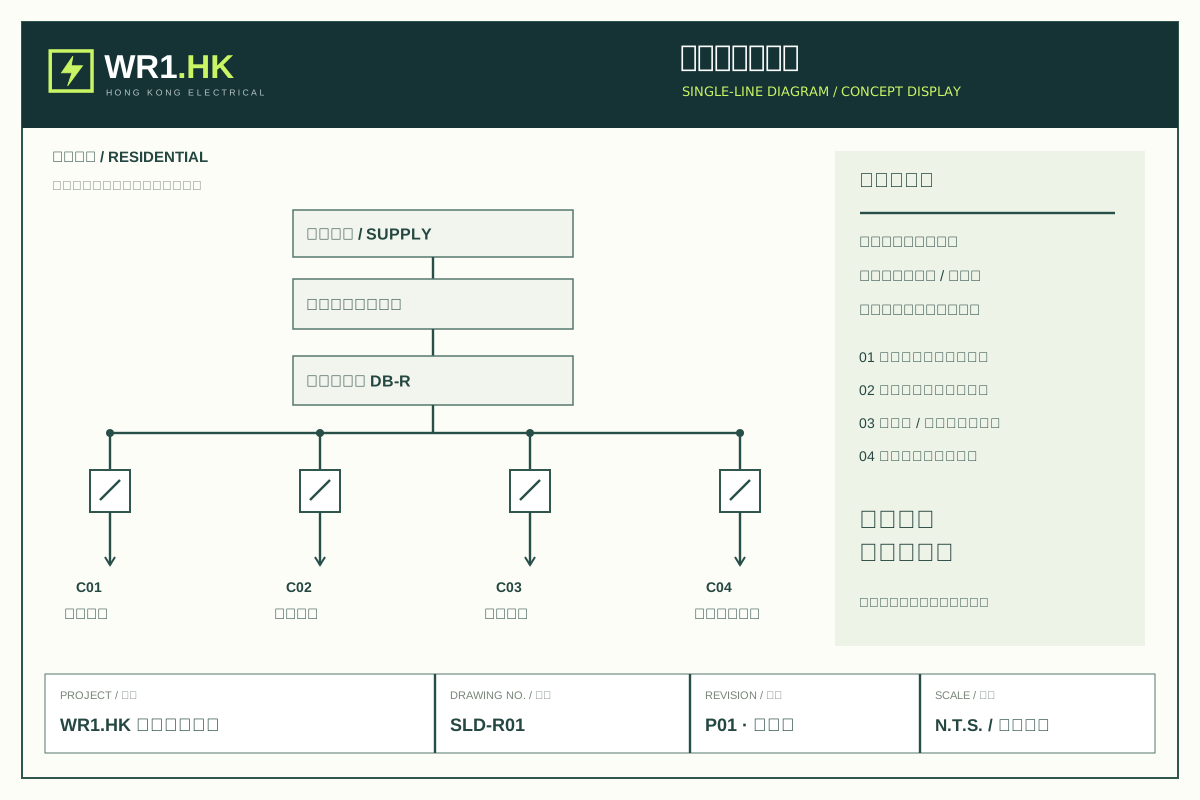
DB-01: C01 living/dining lighting 10 A; C02 living/dining sockets 20 A; C03 air conditioner 20 A; C04 water heater 20 A
What to check:A reduced diagram appears on WR1; the full drawing is attachment SLD-1. Protective devices, conductors and other entries also require actual verification; do not copy these ratings into a real design.
T5
(b) Location and description of inspected part
Entry in this example
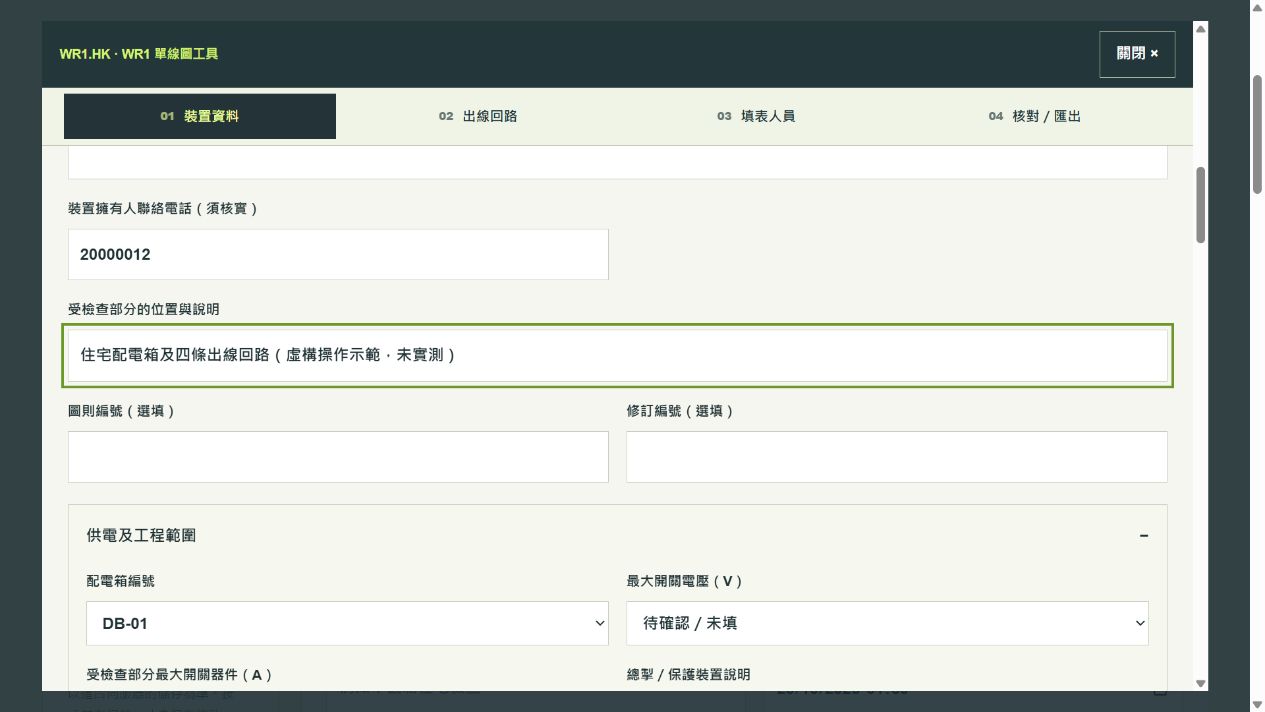
住宅配電箱及四條出線回路(虛構操作示範,未實測)
What to check:The PDF text means a residential distribution board and four outgoing circuits, fictional and untested. Actual wording must identify the location and inspected scope without implying wider coverage.
T6
(c) Largest switching device: amperes
Entry in this example
63 A
What to check:Record the verified rating of the largest switching device in the inspected part. Do not add the four outgoing circuit ratings.
T7
(c) Largest switching device: volts
Entry in this example
220 V
What to check:Verify the actual installation and device information. Do not default to 220 V simply because it is a home.
T8
(c) Single/three phase
Entry in this example
Keep single / 單相; delete three / 三相
What to check:The English and Chinese choices must agree. Verify the actual phase arrangement instead of inferring it from this example.
This diagram explains this example only. Responsible personnel must verify actual devices, conductor sizes, protection and site results.
Illustrative supplySingle phase, 220 V
Illustrative largest switching device63 A
Residential board DB-01
C01
Living/dining lighting
Illustrative rated current
10 A
C02
Living/dining sockets
Illustrative rated current
20 A
C03
Air conditioner
Illustrative rated current
20 A
C04
Water heater
Illustrative rated current
20 A
How are attachment pages counted?
11 drawing page
One separate single-line diagram, SLD-1. The thumbnail in the form is not an extra attached drawing.
33 description pages
One installation attachment plus two circuit schedules. Count the actual attachments in this PDF.
03
Responsible person · The registered electrical worker (REW) actually responsible for design certification.
Part 1, item (1): design REW
This is the design role. The names, registration number, grade and permitted-works text are all fictional and cannot be used for certification.
Page 1 · Find it on the form
The image is a fictional unsigned draft. Read the larger field cards for each entry.
R1
Name in the Chinese declaration
Entry in this example
示範電工(虛構)
What to check:This fictional name matches the PDF. For real work, verify the person responsible for this design certification and their registration.
R2
Name after English ‘I’
Entry in this example
DEMO WORKER - NOT REAL
What to check:Both language entries must identify the same responsible person.
R3
Registration No.
Entry in this example
DEMO-NOT-VALID
What to check:An invalid demonstration string. Enter the actual REW’s valid registration number for real work.
R4
Expiry Date
Left blank in this draft
Blank: no real registration evidence
What to check:This is the registration expiry date, separate from inspection and signing dates. Fill it only after verification.
R5
Grade
Entry in this example
A (DEMO)
What to check:A field illustration, not an A-grade qualification. Use the actual registered grade.
R6
Permitted Works
Entry in this example
示範欄位/非註冊資格
What to check:The PDF explicitly says this is a demo field, not a qualification. Use the actual permitted works; do not infer them from ‘A’ or one switch rating.
R7
Contact Tel. No.
Entry in this example
20000021 (fictional; do not call)
What to check:The REW’s telephone for this role, separate from the owner and REC.
R8
Signature of REW
Left blank in this draft
Blank: no design certification made
What to check:The actual responsible person signs after the required verification. The tool does not apply stored signature samples.
R9
Date Signed
Left blank in this draft
Blank: unsigned
What to check:Use the actual signing date. Do not default to today or enter the registration expiry date here.
Responsible person · An authorised representative of the relevant registered electrical contractor (REC).
Part 1, item (2): REC design endorsement
The representative’s name and contractor’s name are different entries. Details may be organised in advance, but actual endorsement requires the authorised person’s verification.
Page 1 · Find it on the form
The image is a fictional unsigned draft. Read the larger field cards for each entry.
C1
Representative: Chinese name and English ‘I’
Entry in this example
示範代表(虛構) / DEMO REPRESENTATIVE
What to check:Both language entries identify the same authorised representative, not the contractor company.
C2
Contractor: Chinese name and English ‘on behalf of’
Entry in this example
示範承辦商(虛構) / DEMO CONTRACTOR - NOT REAL
What to check:Enter the relevant REC’s name. Do not swap it with the representative’s personal name.
C3
REC Registration No.
Entry in this example
DEMO-NOT-VALID
What to check:Use the contractor’s valid registration number, distinct from the individual REW number.
C4
REC Expiry Date
Left blank in this draft
Blank: no real registration evidence
What to check:Verify the contractor registration expiry date; this is not the expected project completion date.
C5
REC Contact Tel. No.
Entry in this example
20000022 (fictional; do not call)
What to check:The actual contractor’s contact telephone, shown separately from the REW and owner.
C6
Signature of REC
Left blank in this draft
Blank: not endorsed
What to check:The relevant authorised representative endorses actual work. No real signature or company stamp is used in this example.
C7
REC Date Signed
Left blank in this draft
Blank: unsigned
What to check:Use the actual date of this endorsement; do not automatically copy the REW’s date.
Responsible person · The REW actually responsible for this installation, inspection and testing certification.
Part 2, item (3): installation, inspection and testing REW
The same fictional details are repeated only to show their positions. Actual design and inspection roles may involve different people and must be verified independently. Neither declaration is selected because this example was not tested.
Page 1 · Find it on the form
The image is a fictional unsigned draft. Read the larger field cards for each entry.
I1
Name in the Chinese declaration
Entry in this example
示範電工(虛構)
What to check:Verify the person responsible for this role; an entry in Part 1 does not establish that it is the same person.
I2
Name after English ‘I’
Entry in this example
DEMO WORKER - NOT REAL
What to check:It must identify the same person as this section’s Chinese entry, not an unverified copy of the design role.
I3
REW Registration No.
Entry in this example
DEMO-NOT-VALID
What to check:Verify the registration of this responsible worker. The demonstration string has no registration validity.
I4
Expiry Date
Left blank in this draft
Blank: no real registration evidence
What to check:Verify this worker’s registration expiry separately from the inspection and signing dates.
I5
Grade
Entry in this example
A (DEMO)
What to check:A position illustration only. The actual grade must match registration and be appropriate for the relevant work.
I6
Permitted Works
Entry in this example
示範欄位/非註冊資格
What to check:Verify this responsible worker’s permitted works; do not infer them from the design role or example.
I7
Contact Tel. No.
Entry in this example
20000021 (fictional; do not call)
What to check:Verify this REW’s actual contact telephone, not the customer’s telephone.
I8
Signature of REW
Left blank in this draft
Blank: no actual inspection or testing completed
What to check:Completing fields or exporting a PDF is not inspection. The responsible person signs after the required work and verification.
I9
Date Signed
Left blank in this draft
Blank: unsigned
What to check:This is the actual signing date for this role, distinct from the inspection dates in the two declaration paragraphs.
I10
First declaration: installation described in Part 3 inspected
Left blank in this draft
□ Unticked
What to check:The untested example cannot assert compliance or safe working order. The responsible REW selects the applicable paragraph based on completed work.
I11
Actual inspection date in the first declaration
Left blank in this draft
Chinese year/month/day and English date blank
What to check:When this paragraph applies, enter the same actual inspection date in both languages. Do not default to today.
I12
Second declaration: part inspected; valid WR1(A) received for the rest
Left blank in this draft
□ Unticked
What to check:This is not a substitute for unfinished inspection. Verify applicable valid WR1(A) certificates for the other parts. No such certificates exist in this example.
I13
Actual inspection date in the second declaration
Left blank in this draft
Chinese year/month/day and English date blank
What to check:Complete this date only when the partial-inspection paragraph actually applies. Do not tick or date both paragraphs.
Responsible person · An authorised representative of the REC relevant to this section.
Part 2, item (4): REC endorsement and records
Fictional entries are repeated for illustration. Verify this contractor and representative independently. The endorsement also includes the form’s statements about giving inspection records to the owner and retaining copies; it is not merely a stamp position.
Page 1 · Find it on the form
The image is a fictional unsigned draft. Read the larger field cards for each entry.
E1
Representative: Chinese name and English ‘I’
Entry in this example
示範代表(虛構) / DEMO REPRESENTATIVE
What to check:Verify the authorised representative for this section; do not automatically copy Part 1.
E2
Contractor: Chinese name and English ‘on behalf of’
Entry in this example
示範承辦商(虛構) / DEMO CONTRACTOR - NOT REAL
What to check:Verify this section’s relevant REC name, distinct from the representative’s personal name.
E3
REC Registration No.
Entry in this example
DEMO-NOT-VALID
What to check:The demonstration string has no registration validity. Enter the actual relevant contractor’s valid number.
E4
REC Expiry Date
Left blank in this draft
Blank: no real registration evidence
What to check:Verify this contractor’s registration expiry date, separate from inspection and signing dates.
E5
REC Contact Tel. No.
Entry in this example
20000022 (fictional; do not call)
What to check:Verify the actual contact telephone for the contractor in this section.
E6
Signature of REC
Left blank in this draft
Blank: not endorsed
What to check:The authorised person verifies this declaration, delivery of records and retained copies before endorsement. No such confirmation is made in this example.
E7
REC Date Signed
Left blank in this draft
Blank: unsigned
What to check:Verify the actual endorsement date separately from the REW signing date, inspection date and registration expiry.
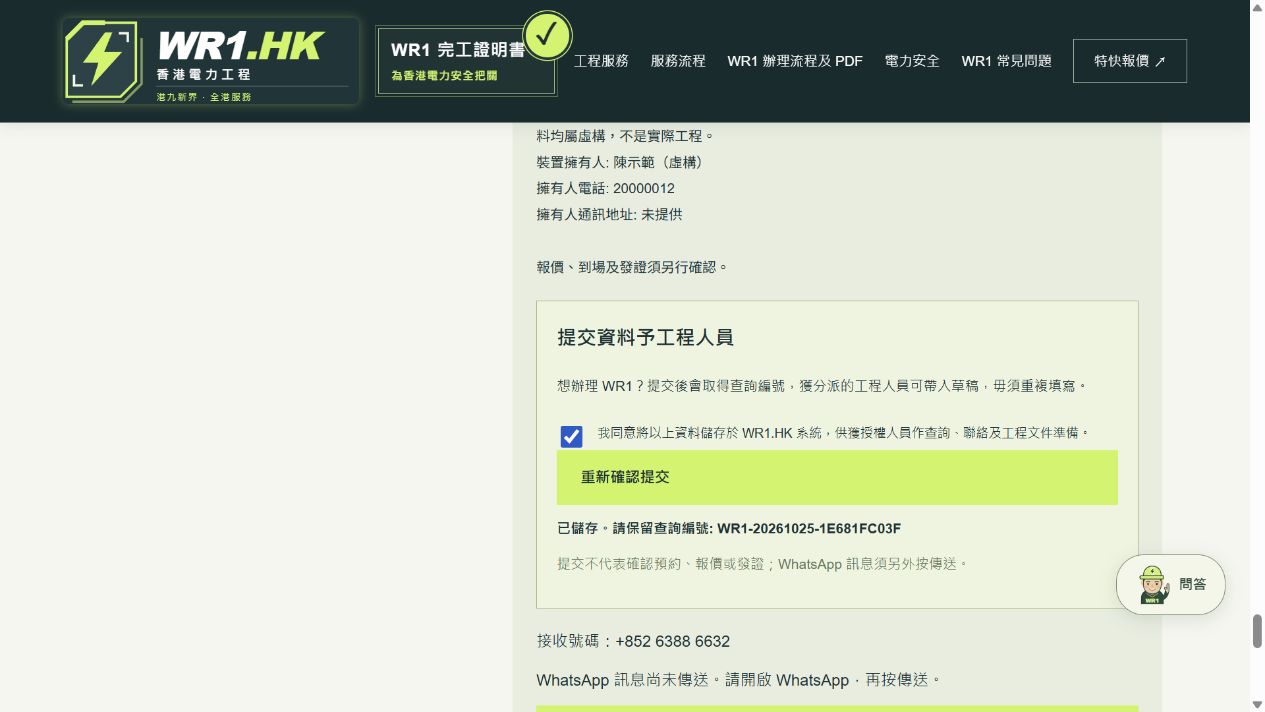
These screenshots show the same fictional project. Supplied customer details carry into the draft. Personnel eligibility, technical entries and inspection conclusions still require verification.
01Customer enters address, owner and telephone
02Administrator reviews and assigns the same project
03Worker accepts and opens the supplied details
04Verify site, circuits and each responsible role
05Preview the diagram and export an unsigned PDF
06Verify actual work, sign, endorse and hand over
Customer supplies address, owner and phoneWorker retrieves the same details
Six mistakes to avoid before exporting
×Treating the enquiry contact as the installation owner, or using the REC telephone for the owner.
×Counting the whole six-page document as attachments instead of one drawing plus three description sheets.
×Treating the example’s 63 A / 220 V or circuit ratings as real residential specifications.
×Automatically copying design REW / REC details into the inspection and testing section without checking.
×Confusing registration expiry, actual inspection and each person’s signing date.
×Ticking compliance declarations without inspection, or treating an exported draft as an issued WR1.
Blank in this draft does not mean optional. Responsible personnel must complete the final document according to the actual work.
Page 1 contains Part 1 for design and Part 2 for installation, inspection and testing. Page 2 contains Part 3 for installation particulars. You can organise Part 3 first, before the responsible personnel complete Parts 1 and 2. The enquiry contact and installation owner may be different people.
02
Part 3, item (5): customer details
Provide the full Hong Kong installation address, the owner’s name or organisation and contact telephone. Give a separate correspondence address if it differs. An example such as Flat A, 8/F, Example Building, 1 Example Street is fictional and must be replaced with actual details. Obtain authority before providing another person’s information.
03
Part 3, items (a)–(c): technical entries
The responsible worker prepares the installation description and/or diagram for the actual inspected scope and counts additional drawings and description sheets. Item (a) holds the single-line diagram; (b) identifies the inspected location and scope; (c) records the verified largest switching device rating, voltage and phase, deleting the inapplicable option. Do not guess values from a sample or a single circuit.
04
Part 1, items (1) and (2): design and endorsement
The REW responsible for design certification enters their name, registration number, expiry, grade, permitted works, telephone and signing date. For the REC entry, distinguish the authorised representative from the contractor and verify registration details. Design and inspection may involve different personnel; do not copy one person into both roles without checking.
05
Part 2, items (3) and (4): inspection and dates
The REW selects the applicable declaration: inspection of the installation described in Part 3, or inspection of only part with valid applicable WR1(A) certificates received for the other parts. Record the actual inspection date, separately from signing dates. Do not preselect conclusions or default to today. An authorised REC signatory endorses the record and confirms delivery and copy retention as stated on the form.
06
Use the tool without retyping customer details
Customer submission → administrator review and assignment → reviewed partner accepts → worker opens the same project. Supplied address, owner and telephone details carry into the draft. Complete only missing or changed entries, verify personnel profiles, site details and circuits, preview the single-line diagram, then export an unsigned WR1 PDF.
07
Review, sign and hand over
Check the address, inspected scope, drawing counts, registration entries and dates for consistency. Do not certify uncompleted or unverified work. The tool does not store or apply signature samples. Its PDF leaves signatures blank for responsible and authorised personnel to complete after the required verification. Never pre-sign blank certificates or circulate reusable signature samples.